
This post is adapted from a talk I gave at the Write the Docs Bay Area Meetup in July 2026.
I want to start by saying this: I acknowledge that AI has really rocked the technical writing industry. No matter what your situation is right now, that’s something we all have in common.
But even with all the challenges AI presents for writers, I encourage you to look at the AI glass half full. It’s making things possible for a single writer that would previously have required a whole team and months of work.
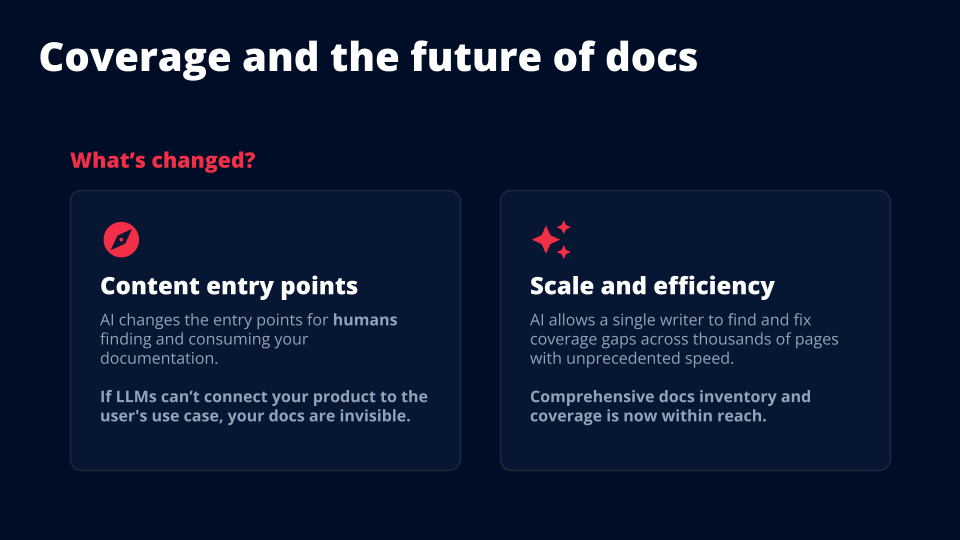
If you’re a lone writer at a startup, a freelancer, looking for work, or just getting started, those capabilities are available to you, too. And learning how to use them can put you ahead of the curve.
I recently led an information architecture (IA) project at Twilio. We made quite a few changes, but when I thought about what I wanted to share with a group of technical writers, it came down to this: what was the smallest amount of effort they could do for the biggest amount of impact?
For us, it was finding and filling gaps in docs coverage.
This is one practical example of how AI helped one writer scale up their work. Your docs might look very different from ours, but hopefully the process gives you some ideas about what you could do with your own.
What do I mean by coverage?
I don’t just mean, “Do you have a tutorial for every feature?”
I think about coverage in two directions.
First, there’s discoverability. Are you covering the ways people actually search for your content? Their use cases, their intent, and the language they use to describe what they want to do?
Then there’s depth. Are you covering the full spectrum of what people need, from someone who’s brand new to your product through someone who needs to troubleshoot an edge case or optimize an advanced implementation?
You might have a tutorial for every single thing your product does. But if people can’t find those tutorials using their own language, or the content doesn’t meet them at their level, they’re going to get their answers somewhere else.
And increasingly, that somewhere else is an AI answer engine.
For this project, I was focused on humans finding and consuming documentation through tools like ChatGPT and Gemini. Agents are a little bit of a different breed, and that’s a separate discussion.
The challenge here is that people don’t necessarily search using your product names. They ask things like, “How do I send voice notifications?” They know what they want to accomplish, but they might not know what you call the product that does it.
If an answer engine doesn’t connect your product and documentation to that use case, your docs can remain invisible.
The opportunity is that AI can also help you find and fix those gaps across thousands of pages. A comprehensive inventory and coverage analysis is now within reach in a way that it wasn’t before.
What a coverage gap looked like for us
Before the IA project, I asked Gemini:
“How do I send voice notifications with Twilio?”
That’s a common use case for Twilio’s Programmable Voice product. Ideally, Gemini would use our guides for making outbound phone calls to answer it.
That wasn’t what happened.
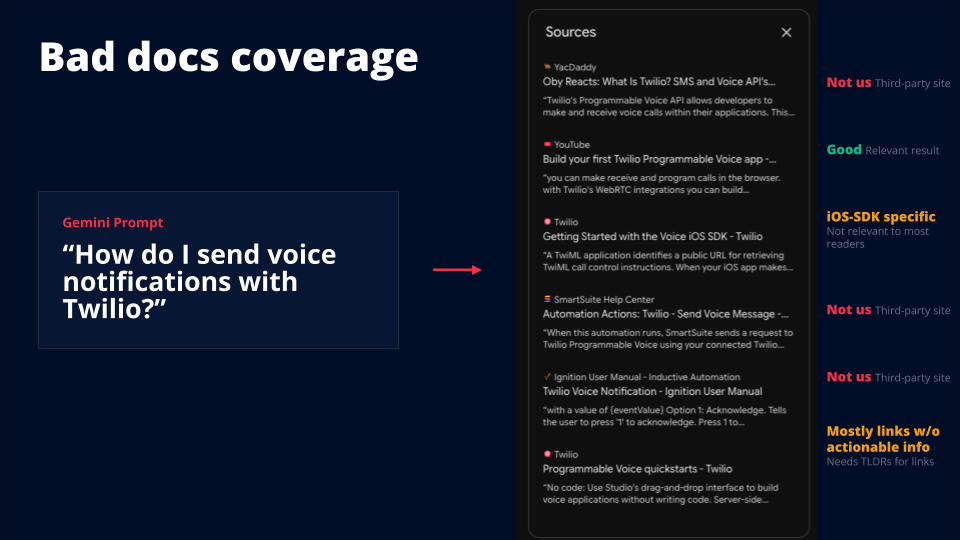
Of the six sources it returned, three weren’t from Twilio at all. Third-party sources might be helpful, but they can also contain incorrect or outdated information. We wanted our own documentation to show up.
Two sources were from Twilio docs, but they weren’t great matches. One was specific to the iOS SDK, which covers only a subset of Programmable Voice users. The other was a landing page with no actionable information about how to do the thing.
There was one source I considered a good match: a YouTube video about building your first Programmable Voice app.
The documentation existed. But it wasn’t showing up well for the way someone would actually ask the question.
Now multiply that problem across about 9,000 documentation pages, contributed by more than 300 employees over many years.
No one person knows everything covered in those pages. That’s completely unrealistic. But we needed to understand coverage by use case, product, beginner versus advanced, and other ways people might look for information.
And the goal was for one writer, me, to do this work in one quarter.
So we needed a workflow that made that attainable.
Step 1: Create an inventory of the product and the docs
We started with two inventories: what people use the product to do, and what our documentation already covers.
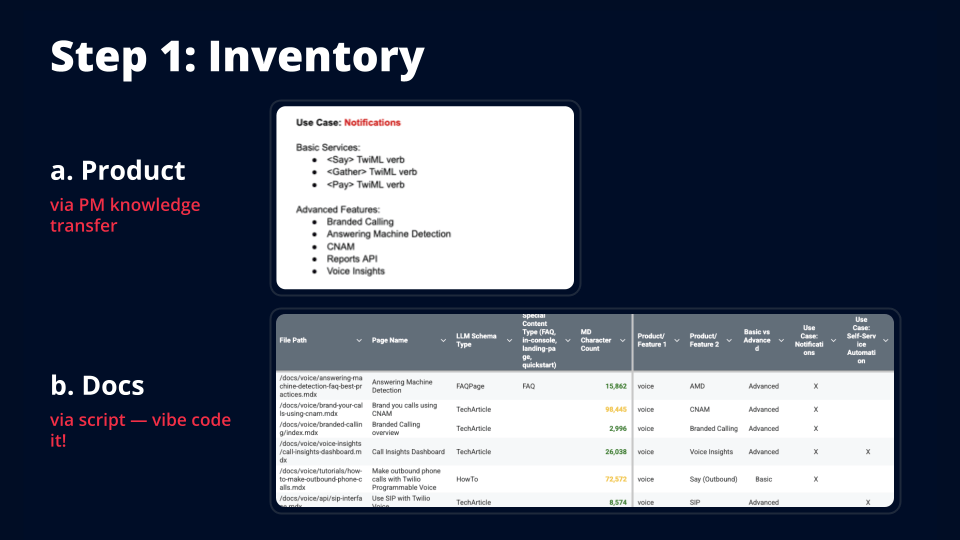
The product inventory
This part required working with the people who held the product knowledge. At Twilio, that was our product managers. At your company, it might be someone else.
The goal was to get that knowledge out of their heads:
- What are the common use cases?
- Which services and features support each use case?
- What information would someone need to build it?
For example, sending voice notifications is one use case for Programmable Voice. Someone building that might need to make an outbound call and play a message. They might also want more advanced capabilities, like answering machine detection, so they can decide what to do when voicemail picks up.
Programmable Voice has lots of features, but only a subset is relevant to that particular use case.
We identified about 10 common use cases for Voice and mapped the relevant services and features to each one. That gave us a reference for identifying which docs belonged with which use cases.
This was the part that took more time, because it required extracting knowledge from an expert.
The docs inventory
The next part I vibe coded.
I went to Gemini and asked for a Python script that would recursively walk through our docs repository and collect information about each page.
That included the file path, page name, and other information we wanted to track. For this project, the important part was identifying the products and features used on each page.
I gave it a list of about 50 products and features and had it look for those strings in the content. Then I fed it the product inventory so it could map those matches to use cases.
If a page mentioned answering machine detection, and answering machine detection was mapped to notifications in the product inventory, the script marked that page under notifications.
That gave us a large spreadsheet showing our documentation pages, the products and features they used, and the use cases they potentially supported.
It was a starting point for understanding coverage. A feature appearing on a page doesn’t automatically mean that page fully covers every related use case, but now we had something we could work with.
If you don’t use docs as code, you may still be able to do something similar. Your CMS might let you export pages, or you might be able to use your sitemap and collect the content programmatically.
The point is to get your content into a form you can analyze.
Step 2: Label the docs
Next, we put the information from the inventory onto the docs themselves.
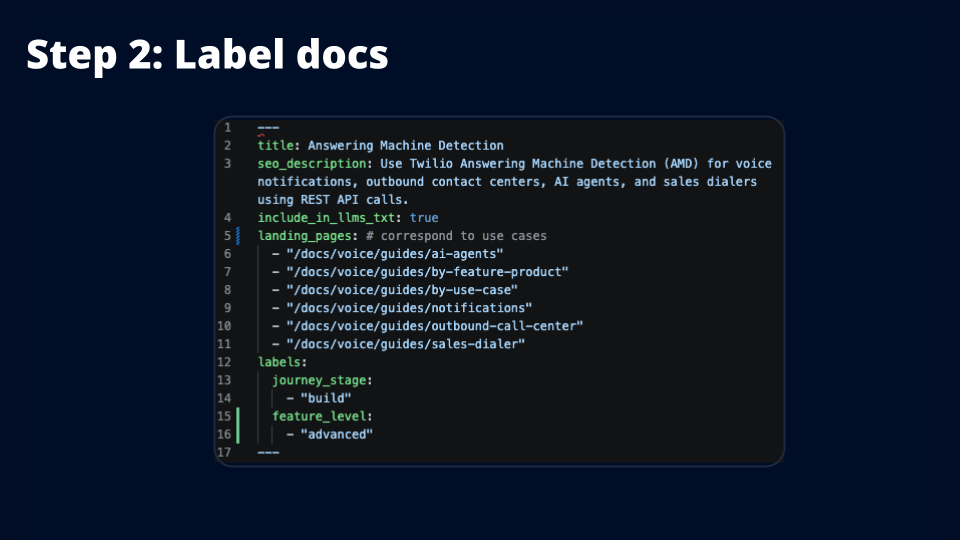
This isn’t strictly required. You could keep working from the spreadsheet. But I like having the labels right on the pages.
First of all, it satisfies my need for everything to be organized. But it also gives everyone on a writing team the same reference information about where a page belongs.
Our labels included things like:
- Use cases
- Journey stage
- Basic versus advanced features
I gave Claude the inventory and asked it to go through the Voice docs directory and add those labels to the front matter.
This was very low lift. It moved the information from the spreadsheet onto the pages in a way that writers could see, without displaying it to customers.
If you use a CMS, you might be able to do something similar with tags or other metadata.
Step 3: Find the gaps
Once we had the inventory and labels, I built a Claude skill to help analyze coverage.
And if the idea of building a Claude skill sounds intimidating, I literally went to Claude and said, “Build me a skill that does this thing.” I didn’t start by opening a SKILL.md file.
The skill first checks for integrity issues and drift. Basically, do the labels still match reality? Content changes over time, and we need to catch that.
Then it creates a content report that we can attach to a Jira ticket.
We focused on two kinds of gaps.
Discoverability gaps
The first check asks what someone might search for, based on our use cases and feature lists, and how well our documentation covers those questions.
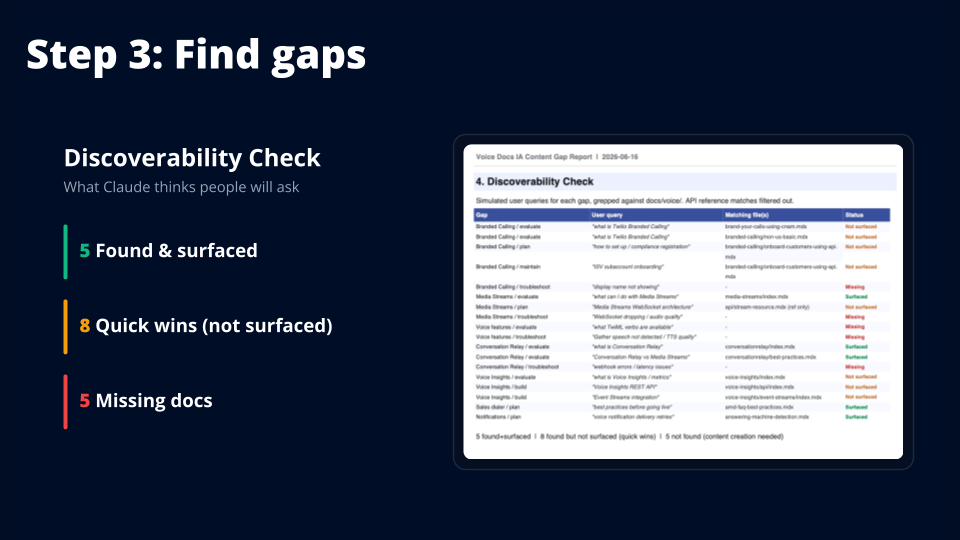
The report separates them into three groups:
- The content exists and is well surfaced.
- The content exists, but we need to make the connection to the use case clearer.
- The content is missing, or Claude couldn’t find it.
That last distinction matters. Claude failing to find something doesn’t prove it doesn’t exist. But it does give us something to investigate.
You could make this analysis more useful by feeding it actual search data, too. Google Search Console or an AI visibility tool could help you compare what Claude thinks people might ask with what people are actually asking.
Even without that extra input, it gave us a practical place to start looking.
Journey gaps
The second check looks at coverage by use case and stage of the docs journey.
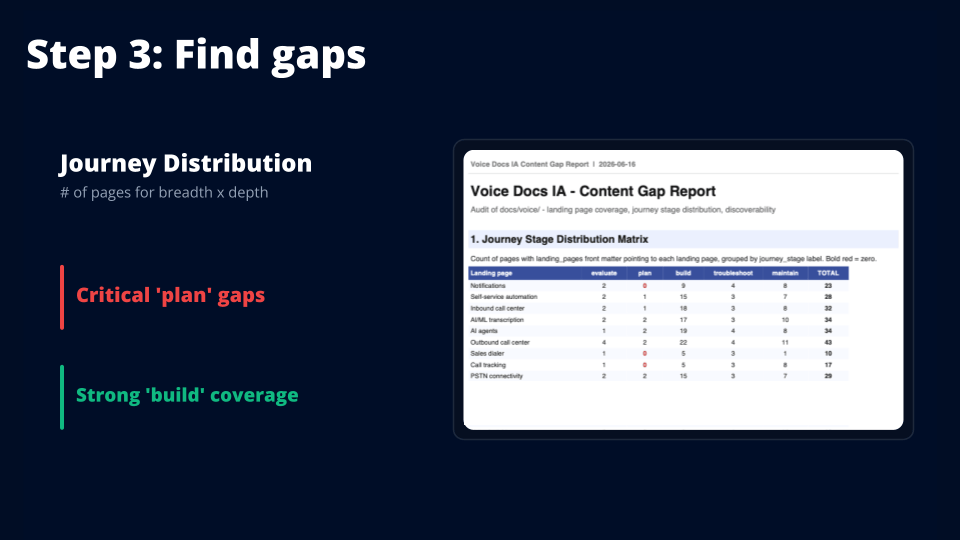
We identified stages like evaluating, planning, building, troubleshooting, and maintaining. Then we looked at how many pages supported each use case at each stage.
This made some holes pretty obvious. We had strong build coverage, but we were missing planning content across several use cases.
That’s useful information. Having lots of tutorials doesn’t necessarily help someone who hasn’t figured out how to approach their implementation yet.
Page counts don’t tell you everything about quality or completeness, but they help you see where to look more closely.
We run the skill monthly because coverage shifts as the docs and products change. And these were just the gaps we wanted to monitor. Your doc set might have different needs.
Step 4: Fill the gaps
This is probably the most important part, because identifying gaps is only useful if you do something about them.
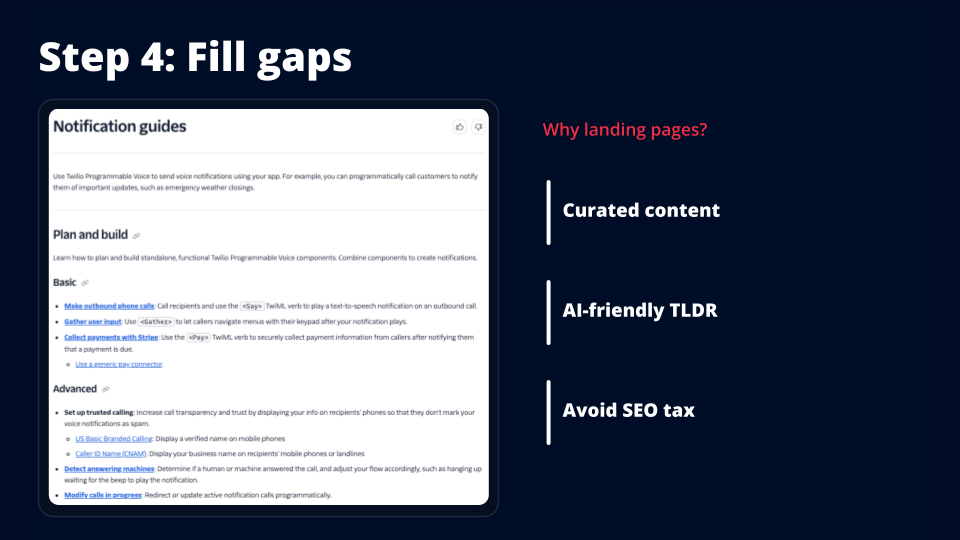
We added about 18 pages as part of the IA project. Instead of writing lots of new tutorials, we created landing pages organized around use cases.
One example was a landing page for voice notification guides.
There are more than 300 pages in our Voice docs. If you’re trying to send notifications, you don’t need all of them. You need the subset relevant to what you’re building.
The landing page brought that subset together without adding more nesting to the sidebar. Our user research had shown that people found a large, heavily nested sidebar overwhelming.
But these pages did more than collect links.
Tell people how to do the thing
Each link included a short description that explained both what the guide covered and how to accomplish the task.
For example, instead of just saying “Make outbound phone calls,” the description could explain that you call recipients and use the <Say> TwiML verb to play a text-to-speech notification.
That gives someone useful information before they even open the tutorial.
In my testing, AI answer engines also liked picking up these little snippets. A one-sentence explanation of how to do the thing could become useful source material for an answer.
Make the use case explicit
The descriptions also connected the underlying capability to the use case.
On the notifications landing page, we used language like notifications, alerts, and reminders where it made sense. We weren’t relying on the answer engine to infer that a general outbound calling tutorial was relevant to someone asking about voice notifications.
When that content is retrieved in smaller pieces, the connection is still there.
Keep one tutorial to maintain
Making an outbound phone call supports several use cases. You might use it for notifications, an outbound call center, or something else entirely.
We didn’t want five or 10 copies of the same tutorial with a few words changed. That would create maintenance overhead and a lot of repetitive content.
Instead, we kept one tutorial and positioned it in the context of each use case through the landing pages.
And those landing pages were also created with AI.
I asked Claude to take the pages labeled for a particular use case, bring them together on a landing page, and add the short descriptions.
We checked everything. But the initial assembly was automated, which made this very manageable for one writer.
Step 5: Measure the results
This is the fun part. I’m a docs data and metrics nerd, so I want to know whether the changes actually did anything.
After the project, I asked Gemini the same question:
“How do I send voice notifications with Twilio?”
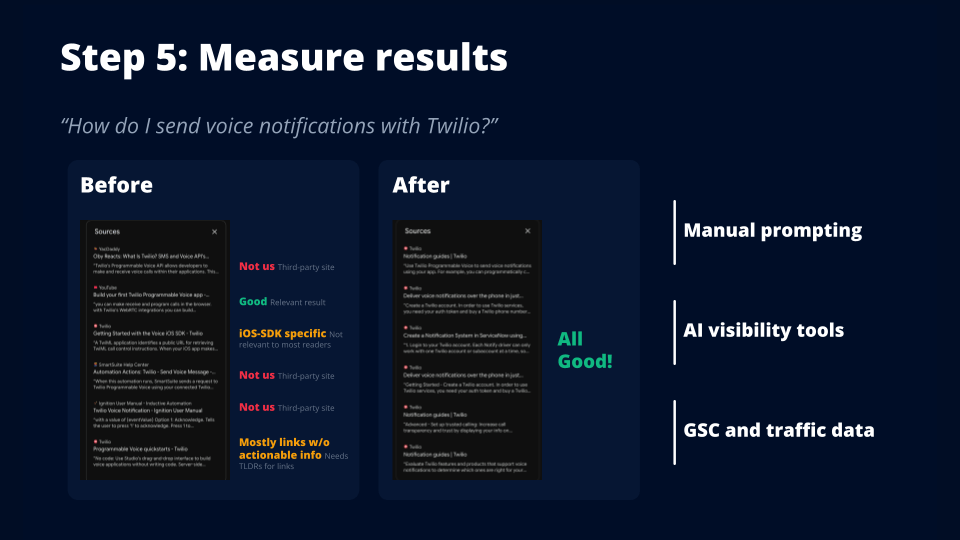
This time, three of the six sources pointed to the notifications guides page we’d added. The other three were also relevant sources.
We went from one good source in that example to six.
That was encouraging, but it was still one before-and-after example. AI answers vary, even when you use the same prompt and model.
If you’re testing manually, ask the question repeatedly. Something like 20 trials can give you a broader signal than a single screenshot. It won’t tell you everything, but it’s a more useful starting point.
We also measured results through an AI visibility tool. At Twilio, we used Evertune to track prompts and the pages cited in responses.
For the use-case prompts we were tracking, we saw a 450% relative increase in the correct pages being cited after the changes.
Some of the new pages appeared as the top cited result in roughly 17–25% of the responses in the tracked prompt sets.
The landing pages had a bigger impact than I expected.
You can also look beyond citations. We use Amplitude to understand traffic, journeys through the docs, and conversion to paid accounts. Google Search Console can help you understand search queries and clicks to your pages.
Those measurements answer different questions. Are people finding the content? Are they moving to the next useful page? Are they becoming customers?
The important thing is to decide what outcome you care about and measure that, instead of stopping at “we published some pages.”
What could one writer do with your docs?
The exact workflow we used at Twilio may not be the best fit for your documentation. You might have a different publishing system, different coverage gaps, or different people holding the product knowledge.
But the pieces are adaptable: get the knowledge out of people’s heads, inventory what you have, label it, find the gaps, fill them, and measure what happens.
AI made the scripting, labeling, analysis, and page assembly much faster. I still needed to decide what mattered, work with product experts, check the output, and figure out whether the changes helped.
That’s the opportunity I want more writers to see.
A comprehensive coverage project across thousands of pages used to feel like something you needed a large team and a lot of time to attempt. Now, one writer can build a workflow that makes it attainable.
So even with all the challenges AI presents for our field, I encourage you to try things like this. Be the writer who learns how to use it, tests what’s possible, and builds something useful.
The future of docs is being built now. We get to help build it.


Leave a Reply